NextJS로 만든 블로그에 utterances 적용하기
2022년 07월 01일
utterances는 무료오픈소스로 댓글 기능을 간단하게 구현하게 해줍니다
GitHub Issue 기반이기 때문에 블로그 플랫폼을 이전해도 기존 댓글이 유지됩니다
1. Utterances repo에 설치하기
Utterances를 설치 하는 곳!
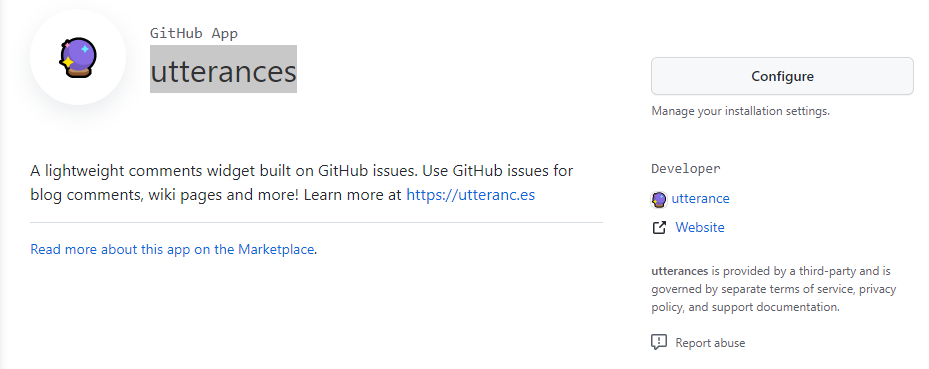
위 사이트로 들어가면 지금 사진에는 제가 먼저 인스톨을 해서 그렇지만 configure에 install버튼이 있습니다. 그곳으로 들어가셔서 설치하고 싶은 repo에 설치를 해주면 됩니다.
2. 스크립트 생성하기
스크립트를 생성하는 곳!
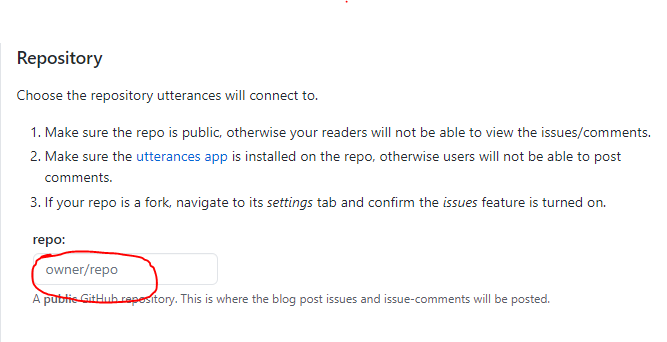
위 주소로 들어가면 repo칸(빨간동그라미)에 자신의id / 저장소이름
이렇게 넣으면 됩니다
ex) kagrin97/NextJS-blog
그리고 밑에 설정들을 체크하다 script를 자동으로 만들어 줍니다
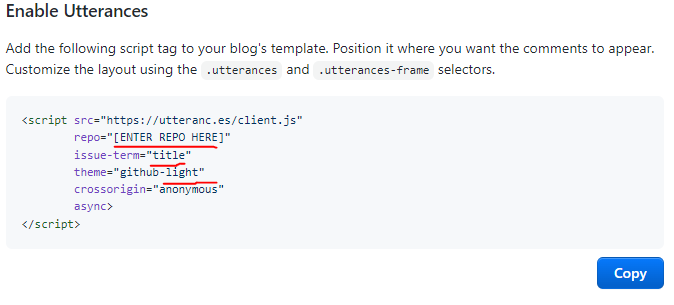
일단 이정보를 가지고만 있어 줍시다.
3. 코드로 구현하기
import React, { useEffect, useRef } from "react";

const Comments = () => {
  const ref = useRef(null);

  useEffect(() => {
    const script = document.createElement("script");

    script.src = "https://utteranc.es/client.js";
    script.async = true;
    script.setAttribute("repo", "kagrin97/NextJS-myblog"); //자신의 repo
    script.setAttribute("issue-term", "title"); // tilte로 설정합시다
    script.setAttribute("theme", "github-light"); // 테마
    script.setAttribute("label", "blog-comment");
    ref.current.appendChild(script);
  }, []);

  return <div ref={ref}></div>;
};

export default Comments;
components폴더에 Comments.tsx를 생성해서 만들어줍시다.
js를 사용해도 좋습니다.
scrip를 가지고와서 속성값을 수정하는데
아까 받은 정보처럼 코드를 구현하면 오류가 뜹니다.
오류가 뜨는이유는
sript에 repo, issue-term 속성이 없기 때문에 setAttribute를
이용해서 속성을 추가하는 것이죠.
import Comments from "components/Comments";

return (
    ....
    <Comments />
    ...
)
그리고 만들어진 Comments를 사용하고싶은 곳에다가 집어 넣으면
완성이됩니다.
- 다크 모드일때 댓글창 theme 변경하는 방법
저는 next-theme을 사용해서 현재 브라우저의 theme 정보를 토글 할수있습니다.
해당 패키지를 사용해서 댓글창 theme를 변경하는 방법을 설명하자면...
step by step
-
theme 정보가 변경되면 Comments 컴포넌트를 새로 생성합니다.
-
새로 생성될 Comments 컴포넌트에 theme에 따라 Comments theme를 변경합니다.
-
기존에 존재하는 Comments를 삭제합니다.
구현 된 코드 👇
import React, { useEffect, useRef } from "react";
import { useTheme } from "next-themes";

export default function Comments() {
  const ref = useRef(null);
  const { theme } = useTheme();

  const makeComments = () => {
    const script = document.createElement("script");

    script.src = "https://utteranc.es/client.js";
    script.async = false;
    script.setAttribute("repo", "kagrin97/NextJS-myblog");
    script.setAttribute("issue-term", "title");

    // browser theme에 따라서 Comments theme을 변경해줍니다.
    if (theme === "dark") {
      script.setAttribute("theme", "dark-blue");
    } else {
      script.setAttribute("theme", "github-light");
    }
    script.setAttribute("label", "blog-comment");
    ref.current.appendChild(script);
  };

  const removeExistedComments = () => {
    const existingScript = ref.current.querySelector(".utterances");
    if (existingScript) {
      existingScript.remove();
    }
  };
  useEffect(() => {
    makeComments();
    removeExistedComments();
  }, [theme]);

  return <div ref={ref}></div>;
}